Empowering Visually Impaired Learners with Audio Flashcards

The XRCVC Audio Flashcards Project is an initiative to empower visually impaired students through personalized and accessible learning tools. Integrated into the Xavier’s College student app, the feature allows users to create and access audio flashcards on any topic, along with pre-recorded content and customizable audio settings. 

Designed with inclusivity at its core, the platform enhances self-study for over 100 students by adhering to WCAG standards and providing seamless keyboard navigation and screen reader compatibility.

Timeline

May 2023 – July 2023

Contributions

User Research, Wireframing, Accessibility Design, Prototyping, User Testing

Seeking a concise summary? Here’s an overview

What did I do?

Redesigned learning for visually impaired students by integrating audio-based flashcards into Xavier’s College’s student app. I conducted focus groups to map user needs, designed wireframes and prototypes aligned with accessibility standards, and collaborated with the development team to implement the features using React Native and Firebase. Key elements included seamless screen reader compatibility, customizable audio settings and keyboard navigation adhering to WCAG standards.

What impact did it have?

The platform transformed how over 100 visually impaired students accessed learning materials, empowering them to independently create and customize audio flashcards. The initiative enhanced engagement, accessibility, and inclusivity while setting a precedent for educational tools designed with empathy.

What did I learn?

This experience deepened my understanding of designing inclusive digital experiences. I gained insights into balancing user needs with technical feasibility, iterative prototyping, and creating solutions that prioritize usability and independence for all users.

Project Overview

Collaborators

  • Accessibility experts

  • User research participants (visually impaired students and educators)

  • Mobile app development team


Target Audience

Primary: Visually impaired students at Xavier’s College, relying on assistive technologies for personalized learning.

Secondary: Teachers supporting inclusive education and adapting to assistive tools.

Challenges

  • Existing platforms did not provide features like adjustable audio settings and were incompatible with screen readers

  • Students faced difficulties in creating and accessing customized learning materials

Goals

  • Develop an audio flashcards feature integrated into the Xavier’s College student app

  • Incorporate WCAG-compliant features, including text-to-speech compatibility, customizable audio settings (speed, pitch, volume), and intuitive keyboard shortcuts

  • Enable students to independently create and use audio flashcards, enhancing accessibility and personalized learning

Research

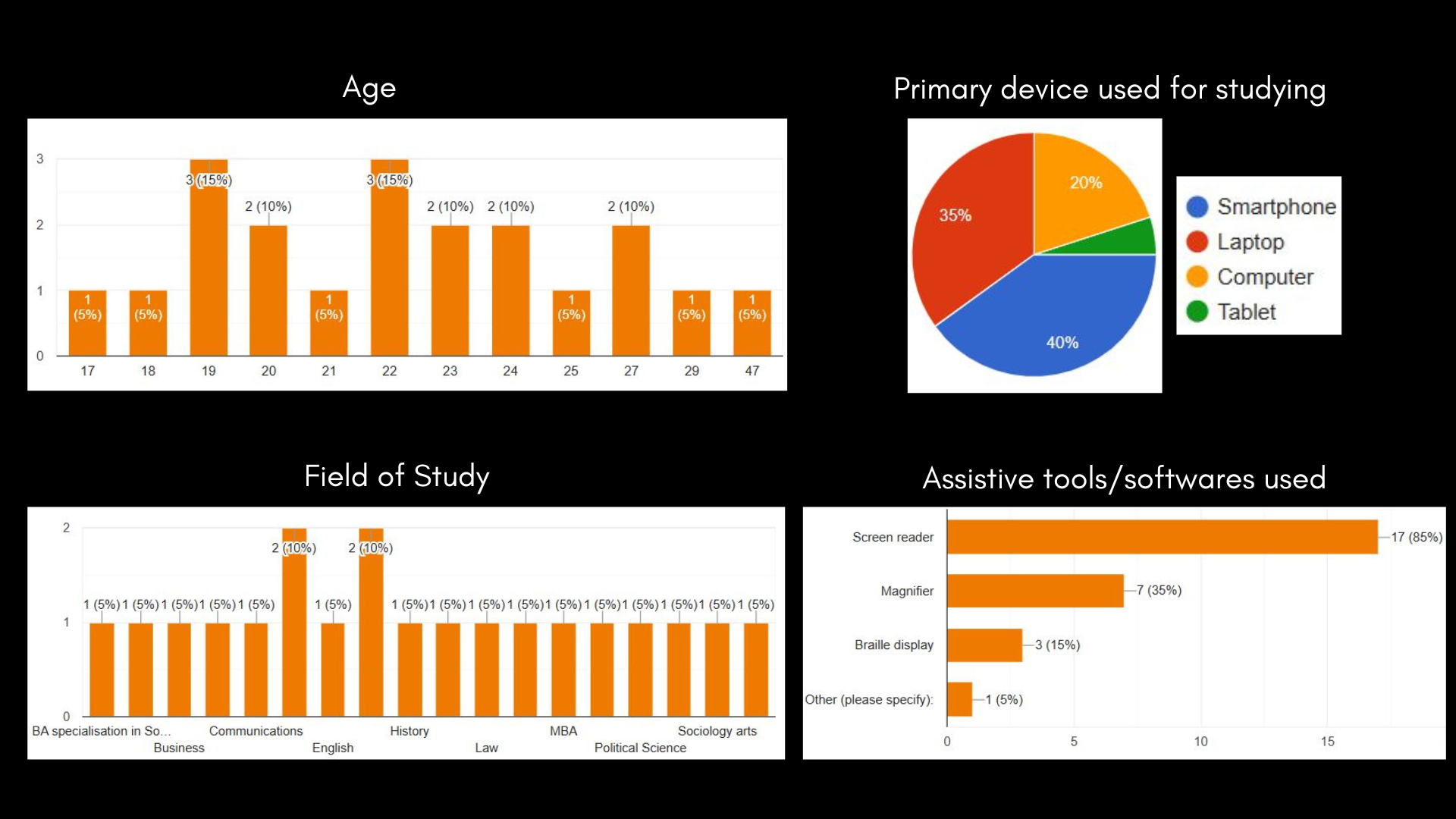
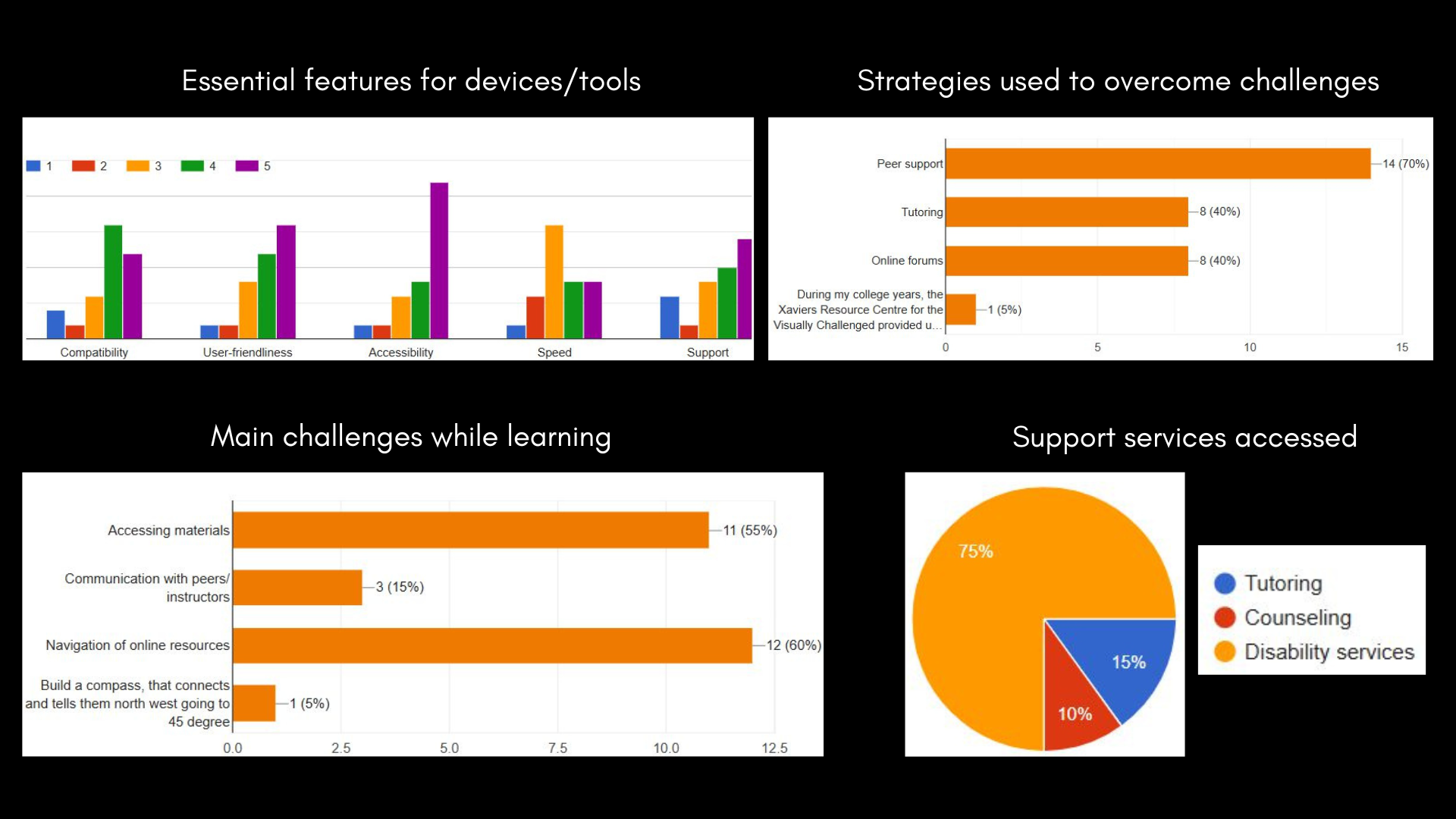
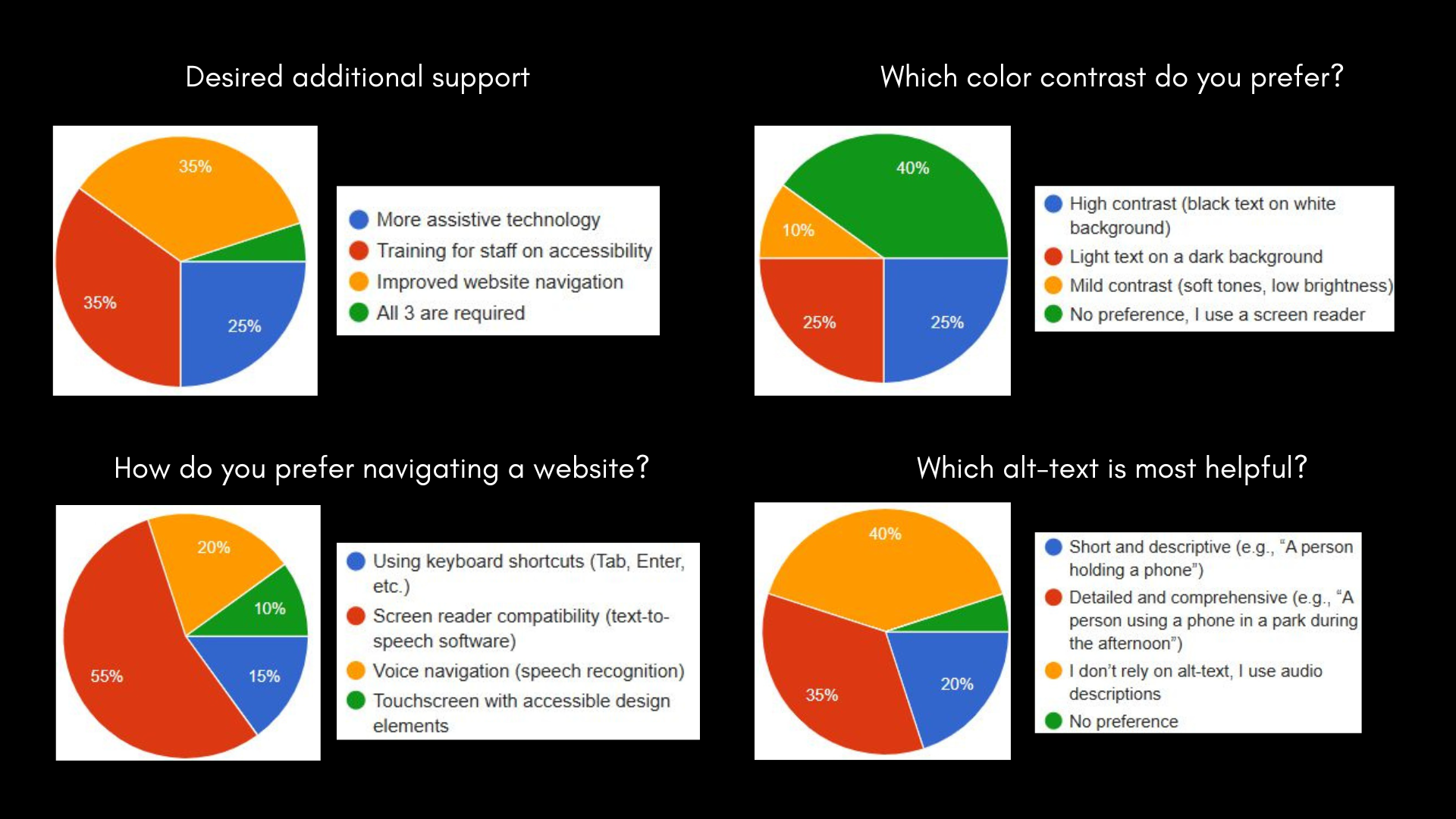
Conducted focus groups, semi-structured interviews, and surveys to uncover the unique needs of visually impaired students and inform the design of accessible learning tools

Pain points identified

Navigation Challenges

Difficulty navigating online resources without assistive features like keyboard shortcuts

Inaccessible Materials

Compatibility issues with screen readers and the lack of easily readable formats affected access

Ineffective Color Contrasts

Soft tones and low brightness were unsuitable for users with visual impairments
Unreadable
Fonts

Standard font sizes and styles were hard to read, requiring customizable text options

Visual Content Limitations

Users struggled with inadequate audio descriptions and poorly detailed alternative text 

Multimedia Accessibility

Audio descriptions were preferred over captions and transcripts for multimedia content

Key features planned

Audio-First Learning

Flashcards integrated with text-to-speech technology, allowing content to be read aloud with adjustable audio parameters, including speed, pitch, and volume

Inclusive Navigation

Seamless transitions through keyboard shortcuts and voice commands, supported by collapsible menus and consistent layouts to minimize cognitive load

Accessibility Features

High-contrast modes, scalable font sizes, and descriptive audio for diagrams and alt-text ensured comprehensive content access for low-vision users

Interactive Tools

Features like bookmarking and progress tracking encouraged engagement, while a dashboard provided insights into completed and pending topics

Sitemap

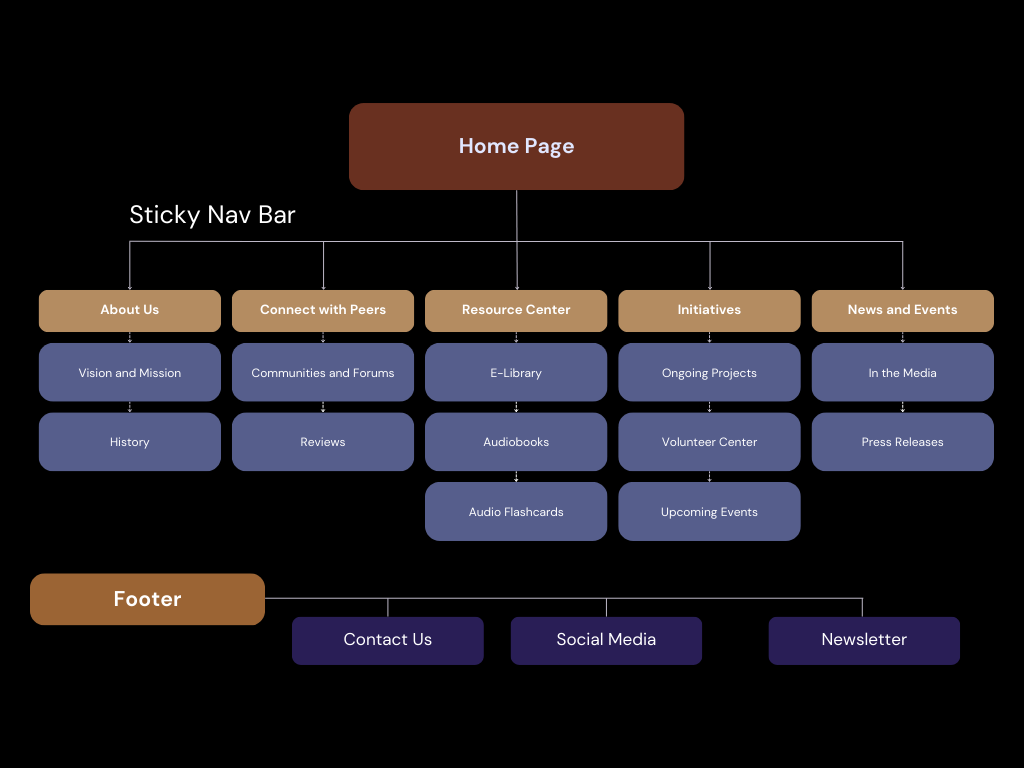
The sitemap organizes key features like audio flashcards and accessibility tools, ensuring seamless navigation for visually impaired users

Wireframes

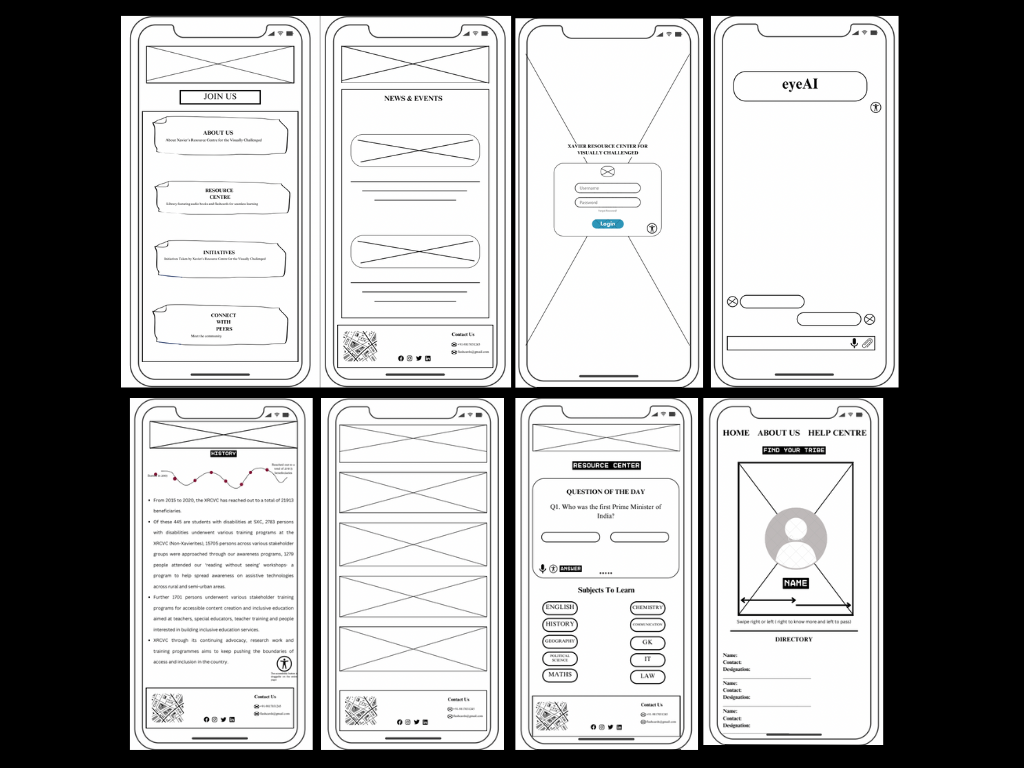
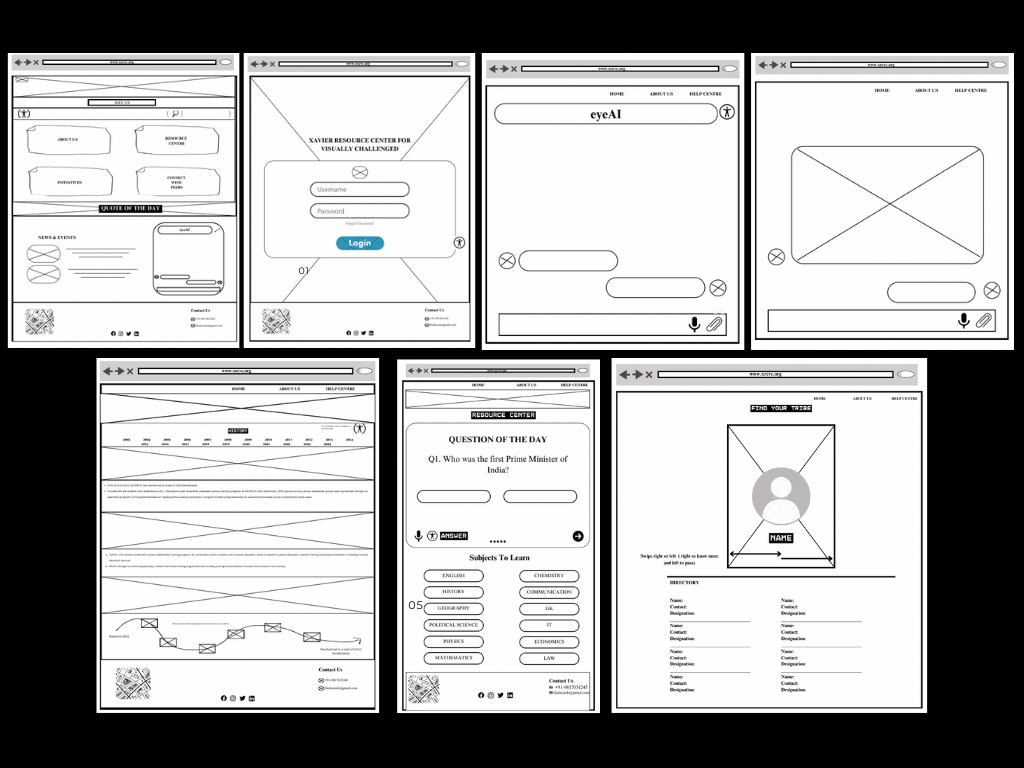
Designed wireframes for both website and mobile to ensure intuitive navigation, accessibility, and a focus on the audio flashcards feature

Integrating into the Xavier's College App

In collaboration with the app development team, I integrated the audio flashcard feature into Xavier’s College’s student app using React Native and Firebase. This system enabled students to create flashcards on any topic and access pre-recorded content, with customizable audio settings for speed, pitch, and volume to cater to diverse needs.

Adhering to WCAG standards, we implemented intuitive navigation with keyboard shortcuts and consistent layouts, ensuring inclusivity and ease of use. The feature empowered over 100 visually impaired students to learn independently, boosting accessibility and engagement while fostering a supportive and inclusive learning environment.

Looking Ahead

Building on the success of the audio flashcards, the project envisions integrating gamified features like badges and rewards to spark motivation and sustained engagement.

Expanding regional language support will ensure the platform resonates with diverse learners across India. By leveraging AI, the app could offer personalized flashcard recommendations, making each user’s learning journey more adaptive and intuitive.